Download the current build and start exporting visuals today.
Vyrkin Studio
Music visuals for independent artists.
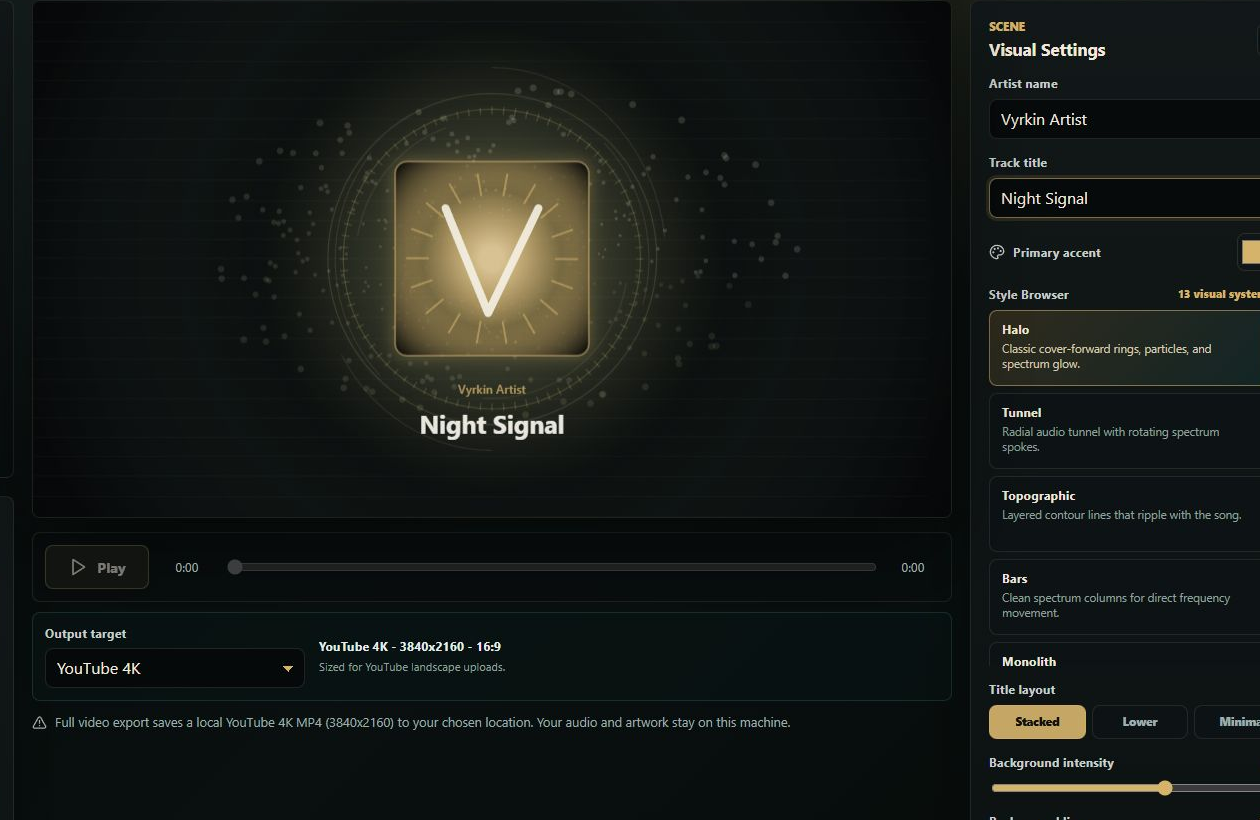
Turn your song and cover art into polished release visuals on your own computer. No uploads, no watermark on free 1080p MP4 exports, and no forced account for local creation.
Price
Free 1080p exports
Privacy
No uploads
Branding
No watermark
Outputs
MP4 now, Pro power later
01
Start making visuals on desktop.
Windows is available first. A macOS version is in development, so Vyrkin can fit the desktop studios independent artists already use.
Windows Early Access
Vyrkin Studio for Windows
- Made for
- Independent artists
- Cost
- Free beta, Pro planned
- Exports
- 1080p MP4, social sizes, and Pro export power later
The Mac build is part of the desktop roadmap, not a separate product.
Download for Windows
This is an unsigned Windows installer. Microsoft Defender SmartScreen may ask you to confirm the install because the app is new, not because your music or artwork leaves your computer.
Installer file: Vyrkin-Studio-0.1.0-win-x64-installer.msi.
File size: 135,436,945 bytes. SHA-256: 9FF102AA0F2B37CD9DAD5395CE9E3A73CEF9AA30B192C126BB743EE17AA290F7.
macOS is still in development. Pro 4K, PNG Sequence, and Advanced Master exports are visible but locked until Pro launches.
FFmpeg helps create MP4 and MOV files locally. FFmpeg is independent and does not endorse Vyrkin Studio.
Email [email protected] for FFmpeg notice, license, or source access questions.
Use this address for install help, privacy questions, release support, and notices.
02
A desktop studio for release visuals.
Vyrkin is for artists who want polished visualizers without sending unreleased songs through a cloud editor or rebuilding the same layout in a timeline for every release.
Use it when a track needs a strong visual for YouTube, socials, teasers, and release-day posts.
Free exports are useful 1080p/social MP4 files. 4K, PNG Sequence, and Advanced Master exports are planned as Pro features.
Vyrkin is a desktop product. The Mac version is part of the same plan, not a separate idea.
03
Your songs stay on your machine.
Unreleased music is private. Vyrkin is built so you can work with your songs and artwork locally, without uploading them to a cloud editor just to make a visual.
Bring in
Your song and cover art
Start from the files already on your computer.
Shape
A visual that reacts to the music
Choose a style, tune the motion, and keep the look close to your release.
Share
Clean files for your rollout
Export without a Vyrkin watermark.
Your songs, cover art, rendered frames, and project files stay on your machine in the current app.
You can make visuals and export free 1080p MP4 files without an account wall.
Future analytics must not include media, file names, file paths, song titles, artist names, audio hashes, or fingerprints.
04
Built for the way artists actually release music.
A visualizer should help the release move faster. Vyrkin keeps the workflow focused on the things artists care about: speed, control, privacy, and files that are ready to use.
Keep a consistent look across the places your music shows up.
Dial in a visual that feels like the track instead of settling for a template.
Make the visual, keep the files, and release on your own terms.
05
Questions artists will ask first.
Clear answers matter before anyone downloads a new desktop app. This section keeps the public promise simple and direct.
Is Vyrkin free?
The public beta includes local creation and watermark-free 1080p MP4 exports for YouTube, TikTok, Reels, Shorts, square, and feed formats. 4K MP4, PNG Sequence, and Advanced Master exports are Pro features coming later.
Will my exports have a watermark?
No. Free 1080p MP4 exports do not add a Vyrkin watermark.
Does Vyrkin upload my music or cover art?
No. In the current desktop app, songs, cover art, rendered frames, and project files stay on your computer.
Why might Windows show a warning?
The first Windows installer is new and may be unsigned. That warning is about installer reputation, not about your media leaving your device.
Is a Mac version coming?
Yes. Windows is first, and a macOS version is in development for the same desktop workflow.
What does FFmpeg do here?
Vyrkin uses FFmpeg locally to help create MP4 exports and planned Advanced Master files. FFmpeg is an independent open-source multimedia project and is not affiliated with or endorsing Vyrkin Studio.
06
Terms in plain language.
The final legal terms still need owner and legal review before public release. The public terms should be clear about what artists own, what Vyrkin owns, and what the app does not promise.
Vyrkin does not give you music, artwork, publishing, sample, trademark, or platform rights. You need those rights before release.
The app, source code, brand, product design, and unreleased plans remain privately owned.
Vyrkin can help make release visuals, but it cannot guarantee platform acceptance, copyright outcomes, monetization, reach, or revenue.
Bundled open-source components keep their own notices, licenses, and rights.
07
Notices for the software inside.
Vyrkin is proprietary, but the desktop app includes third-party components with their own licenses. Those notices should be easy to find before public distribution.
FFmpeg runs on the user's computer for local video export. Vyrkin publishes notice and license information near the download, and FFmpeg source access requests can be sent to [email protected].
FFmpeg is an independent open-source multimedia project. Mentioning it explains the encoder; it should not look like a partnership badge.
The public site should mirror the relevant notices so artists and reviewers can inspect them before installing.
08
A real support route before launch.
Before the public download goes live, artists need one clear place to ask about installing, privacy, billing support, notices, and release questions.
Contact
[email protected]
Use this route for installer help, privacy questions, and release support once the public download is live.
Support scope
Install help, privacy questions, notices, and FFmpeg source access
Keep the route simple enough for artists, but complete enough for release obligations.